School Essentials Vector Icons: An Embroidery Designer’s Review
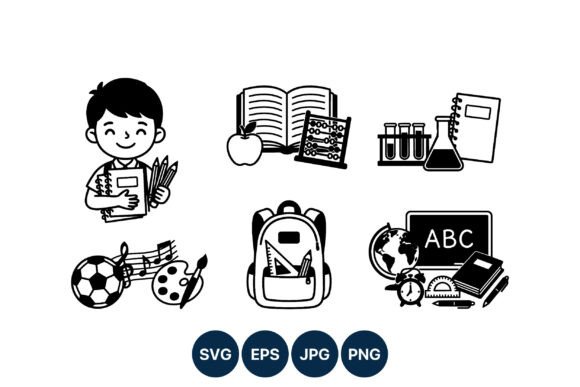
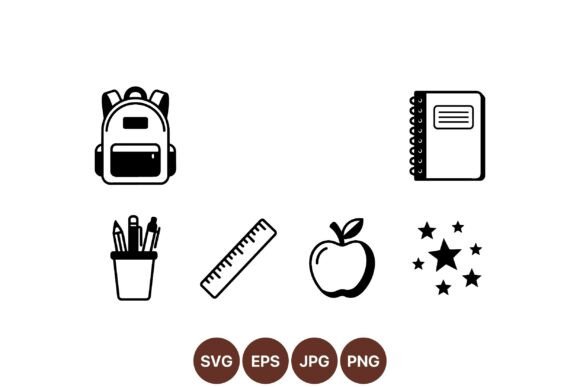
I don’t often get excited about a simple line art set, but the School Essentials Vector Icons collection caught my eye the moment I opened the ZIP folder. As someone who spends most days turning digital artwork into stitch‑ready embroidery files, I know how much a clean, well‑thought‑out vector can matter. The set includes a backpack, notebook, pencil holder, ruler, apple, and a handful of decorative stars — all drawn in a consistent black outline style with no fill, no shading, just crisp, minimalist shapes. It’s the kind of design that immediately sparks project ideas, and I wanted to test it from a real embroidery perspective, not just admire it on screen.
Right now I’m preparing a custom tote bag design for a kindergarten teacher’s end‑of‑year gift. The plan is to combine the apple, a couple of stars, and the pencil holder into a compact emblem that feels both playful and polished. The line art mood of this School Essentials Vector Icons set is exactly what I need — nostalgic without being childish, and modern enough to look intentional on a handmade product. Before I even opened my digitizing software, I spent time just looking at how the shapes interact. The backpack has rounded, friendly contours; the notebook lines are delicate but still readable; the ruler markings are simple dashes that won’t turn into a thready mess. That careful balance is a huge plus for anyone who’s tried to digitize overly detailed clip art.
First Impressions: Clean, Confident, and Thread‑Ready
When I unzipped the folder, the first thing I noticed was the consistency. Every icon in the School Essentials Vector Icons set shares the same line weight, the same cap style, and the same overall scale. That’s not always the case with bundled vectors, and for embroidery it makes a world of difference. I can grab the apple and the notebook, place them side by side, and they’ll look like they belong together without any resizing gymnastics. The black‑only palette is a natural fit for a single‑color machine embroidery design, and I immediately picture a deep navy thread on a natural canvas tote.
The simplicity also means I can think about thread choices more creatively. While the original is black, I’m not locked into that. For a baby shower custom onesie, I might swap to a soft sage green or a muted terracotta. Because the vectors are pure outlines, the color story is entirely up to me. This flexibility is a big deal for a craft business where I need to offer color variations without redesigning anything.
How the Line Art Translates to Stitches
Line art seems straightforward, but embroidery can be unforgiving. A vector outline that’s too thin becomes a nervous, broken running stitch on textured fabric. Too thick, and you lose the airy minimalist feel. The School Essentials Vector Icons sit in a sweet spot. I loaded the pencil holder into my digitizing software and traced it with a slim satin stitch — about 2mm wide — and the shape held beautifully. The ruler’s short tick marks needed a tiny bit of editing; I extended them by a fraction of a millimeter so they wouldn’t disappear into a fleece sweatshirt. That’s normal and expected, not a flaw. The notebook’s spiral binding detail surprised me. It’s drawn as a series of small loops, and I initially worried they’d be too fine. With a slightly longer stitch length and a sharp needle, they stitched out cleanly on a mid‑weight cotton test swatch.
For anyone new to converting vector Graphics to embroidery, this set is forgiving. The Illustrations category product gives you editable paths, so you can quickly separate elements, delete something if you want just the apple and stars, or combine icons into a single composition. I always recommend testing on scrap fabric before committing to a final piece, and that’s what I did. The stars, in particular, are tiny but mighty. They’re decorative, so they don’t need to carry the design, but they add a wonderful handmade charm. I used a simple running stitch for them, and at 1.5mm they still read as stars — no blobs, no thread breaks.
Real‑Life Project: A Teacher’s Tote Bag
Let me walk you through the project I’m actually working on. I’ve chosen a 10‑ounce cotton canvas tote bag in a warm oatmeal color. The embroidery project will feature a centered design: the apple at the top, the pencil holder below it, and three stars scattered around for balance. I’m using a single color — a deep oxidized red — because the teacher loves maroon. I set my hoop size to 5x7 inches, which gives me plenty of room without crowding the corners. The digitized file uses a mix of satin stitch for the main outlines and a lighter fill stitch for the apple’s leaf to give it a subtle texture difference.
When I placed the vector icons into my layout, the process was smooth. The pencil holder’s vertical arrangement worked perfectly as a central anchor, and the apple’s round shape softened the composition. The stars, which I reduced slightly, filled the negative space without making the design look busy. I ran a test stitch on a similar weight canvas, and the result was exactly what I wanted: a crisp, clean design that looks hand‑drawn but reads as professional embroidery. This is the kind of personalized gift that makes customers come back. It’s not just a cute graphic; it’s a thoughtful, well‑executed finished product.
On Fabric Choices: What Works and What Needs Extra Care
Not every fabric will treat these icons kindly. I tested the design on a stretchy baby onesie, and the thin lines of the notebook got a little wobbly without a heavy cut‑away stabilizer. Once I added a firm stabilizer and reduced the stitch density slightly, the lines smoothed out. For baby embroidery or any garment that will be washed frequently, a soft satin stitch with a slightly rounded edge is kinder to the fabric and more comfortable against the skin. The apple and stars held up beautifully on a plush sweatshirt, though I needed to bump up the line thickness a tiny bit to compensate for the nap of the fleece. That’s a quick adjustment in the digitizing stage, and the clean vector paths make it easy.
Dark fabrics present a different challenge. When I flipped the design to white thread on a navy cap, the stars looked a little thin. I thickened the outline by 0.3mm, and the problem vanished. The School Essentials Vector Icons set handles this well because the line art is pure; there’s no fill to reinterpret, and the contrast is stark. I’d confidently use these on a black apron for a boutique kitchen line, or on a natural linen pillow cover for a holiday embroidery gift. The key is always to test thread color and thickness on the exact fabric you’ll use for the final product.
Small Details, Big Impact
The decorative stars might seem like an afterthought, but they’re one of the most useful elements in the set. I’ve used them as standalone accents on a set of kitchen towels, scattered around a monogram for a graduation gift. The notebook and ruler have a similar utility — they work as part of a larger school theme, but I can also isolate the notebook and stitch it onto a bookmark or a pencil case. The backpack is the most detailed icon, and it’s the one I’d be most careful with on small hoop sizes. Below 4x4 inches, the zipper lines and pocket details might start to close up. I’d recommend keeping the backpack at least 3 inches tall for clarity, which is still very manageable for a custom apparel pocket design.
From Digital Asset to Shop Shelf
As an Etsy seller and craft business owner, I’m always thinking about the commercial side. The School Essentials Vector Icons set is a Graphics product, not a ready‑to‑stitch embroidery file. That means I have to digitize each design myself, but I also have complete creative control. I can use these vectors to create printable mockups for my listings, showing customers exactly how the finished embroidery will look on a tote, a cap, or a blanket. A clean vector mockup builds trust and boosts buyer engagement. I can also use the icons to create my own digital embroidery files for sale, provided the license allows it. I always check the included terms carefully. The ZIP folder typically contains SVG, EPS, and AI formats, which are standard for professional digitizing software. The files opened cleanly in my program, with no broken paths or raster artifacts.
For commercial embroidery projects, I can offer the apple design on a set of aprons for a school fundraiser, or the notebook on a custom apparel line for a stationery shop. The theme is broad enough to cover back‑to‑school, teacher appreciation, and even college dorm gifts. The simple style means the design won’t date quickly, and that’s a real advantage for small shop product longevity.
What to Check Before You Stitch
Based on my tests, I’ve put together a quick mental checklist for anyone bringing these vectors into an embroidery project:
- Stitch type test: Run a sample with both satin and running stitches to see which gives the best line quality on your fabric.
- Thread color contrast: A black design on a dark denim will disappear. Test on a swatch of the actual fabric first.
- Hoop size confirmation: The set is versatile, but compositions with multiple icons need space. A 5x7 or larger hoop gives breathing room.
- Stabilizer choice: For stretchy fabrics, use a cut‑away stabilizer. For woven cottons, a tear‑away usually works.
- Detail inspection: Zoom in on the notebook lines, ruler ticks, and zipper details. If they feel too thin, add 0.2–0.5mm in your digitizing software.
- License review: Confirm whether you can sell finished products, create digital embroidery files for resale, or use the icons in branding. Most vector sets allow commercial use of finished items, but always read the fine print.
Where This Set Shines
I’ve used a lot of vector art that looked great on screen but fell apart under the needle. The School Essentials Vector Icons set avoids that. It’s intentionally simple, which makes it a reliable foundation for a handmade product line. I’d feel confident putting the apple on a baby announcement onesie, the notebook on a writer’s tote bag, or the backpack on a child’s back‑to‑school sweatshirt. The design carries a sense of care and nostalgia that resonates with customers, and the clean stitching elevates the finished product from a hobby item to a boutique‑worthy piece.
For embroidery designers who like to build their own files, this is a smart addition to your design assets library. It’s not a one‑click solution, but it gives you a beautiful, well‑constructed starting point that respects your time and your creative freedom. I’ve already printed a mockup of the teacher’s tote bag and the feedback from friends has been overwhelmingly positive. The School Essentials Vector Icons set earned its spot in my permanent collection, and I suspect it’ll show up in my holiday embroidery lineup more than once this year.